How to Ask for Google Reviews: Scripts, QR Codes, and Systems
Quick answer: Ask at the moment a guest tells you they enjoyed the meal, use the words "Google review," put the QR code on the check rather than the table, link straight to the review screen, and make the ask a repeated habit instead of a one-off push.
Asking for reviews is awkward. Servers feel weird about it, hosts forget, and the printed sign by the register gets ignored. The fix is not enthusiasm. It is a small system, repeated nightly, so nobody has to decide in the moment whether to bring it up.
This guide covers the asks that work, the QR code details most restaurants get wrong, and how to keep the habit alive after week two. For the policy side of asking without pressuring anyone, see how to get more Google reviews without being pushy.
1. The last-bite server script
The best moment to ask is right after a guest says they loved the meal. Train servers to listen for the compliment, then answer it with one line.
"Thank you so much, that means a lot. If you have ten seconds, a quick Google review really helps small spots like ours show up when people search nearby."
Why it works:
Put it on the closing checklist next to dessert, coffee, and the bill drop.
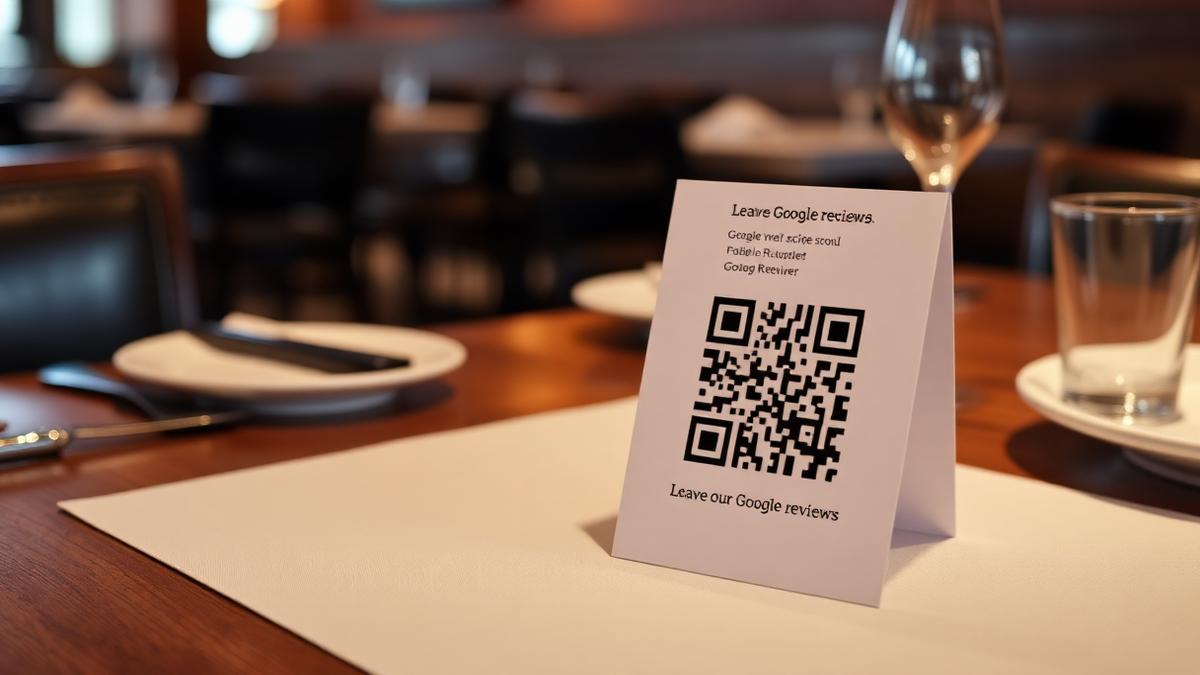
2. QR codes on the check, not the table
QR codes work. Placement decides whether they get scanned.
A code on a table tent competes with food, conversation, and the guest's own phone. A code on the bill folio or check presenter arrives at a natural pause, when the meal is over and the phone is already out. If you change one thing this week, change that.
Add a single short line:
"Loved your visit? Scan to leave a Google review, it takes about fifteen seconds."
3. Table-tent copy that earns a scan
If you do use tents, the ones that work answer three questions in under five seconds: what do you want me to do, why should I, and how long will it take.
Template 1: the direct ask
Help us out in fifteen seconds.
Scan to leave a Google review.
Every review helps us compete with the chains.
Best for casual spots, bars, taquerias, cafes.
Template 2: the gratitude frame
Thank you for choosing us tonight.
If anything was great, would you mind sharing it on Google?
[QR]
[Owner first name and signature line]
Best for family restaurants, neighborhood Italian, brunch.
Template 3: the owner's ask
This is a family-run kitchen, and Google reviews are how new guests find us.
Scan to leave one. It takes fifteen seconds.
Thank you, [Owner first name]
Sign it from a real person. Guests respond to people, not logos.
4. Design rules that matter
| Rule | Why it matters |
|---|---|
| QR code at least 1.2 inches wide | Phones in low restaurant lighting need a big target |
| One QR code per card | Multiple codes split attention and scans drop |
| Plain background behind the QR | Patterns and textures break the scan |
| High contrast text, no script fonts | Guests skim in a few seconds in dim light |
| Owner first name on the card | Personal asks outperform brand asks |
Print on thick cardstock so the tent stands up. A matte finish cuts glare from overhead lights.
5. The link behind the QR code
Generate the QR from a direct Google review link, not your homepage.
Test it on three different phones before printing two hundred copies. The first screen the guest sees should be the star rating selector, not your website. Every extra tap loses people.
6. The next-morning message
If you take reservations through OpenTable, Resy, SevenRooms, or SMS, you already have a channel. Send one message the next morning, around ten.
"Hi Sarah, thanks for joining us last night at [Restaurant]. Would you mind sharing a quick Google review? It really helps us. [link]"
One message, in the morning, never at midnight. Use the guest's name. Do not chase.
7. Regulars and thank-you cards
Regulars are the most underused review source in most restaurants. They love the place, they talk about it, and they almost never leave a review unless someone asks.
Once a quarter, write five or ten short cards by hand:
"Marco, you have been one of our favorite regulars this year. If you ever have a minute, a Google review would mean the world."
Hand it over at the door. Handwritten notes get read.
8. The receipt footer
Almost every POS lets you add a line to printed and emailed receipts. Use it.
"Enjoyed your meal? A short Google review helps our family-owned restaurant grow. [short link]"
On its own a receipt footer will not fill your profile. It reinforces every other ask, and repetition is what builds a steady flow.
Build a system, not a push
| Habit | What it looks like |
|---|---|
| Daily ask | Every server asks at least one happy table |
| Weekly follow-up | One short message to recent guests |
| Monthly check-in | Owner reviews replies, photos, and rating |
A single push creates a spike and then silence. A daily habit creates the steady arrival of new reviews that keeps a profile looking current. If you want to understand what that flow does for visibility, see how reviews affect Google Maps ranking.
Then reply to what you earn
Asking is half of it. Reviews that sit unanswered do very little for you. Reviews answered by name, in your voice, become the thing the next guest reads while deciding. The full method is in the complete restaurant review reply guide, and it matters more than any QR code: restaurants that respond to 100% of Google reviews vs none see about 16.4% more calls, website clicks, and direction requests on their Google Business Profile (SOCi State of Google Reviews, 2022).
Compare restaurant review management software, or Try Wimi free and let the replies keep pace with the reviews your team earns.
Frequently asked questions
- When is the best time to ask a guest for a Google review?
- Right after the guest says something positive about the meal, and again on the check itself. Both moments come after the experience is complete, when there is nothing left to interrupt.
- Where should a review QR code go?
- On the bill folio or check presenter. Table tents compete with food and conversation, while the check arrives at a natural pause with the guest's phone already out.
- What link should the QR code point to?
- The direct Google review link from your Google Business Profile, usually a g.page or maps.app.goo.gl URL. It should open on the star rating screen, not your website.
- Can you offer a discount for a Google review?
- No. Incentivized reviews break Google's policies and can get reviews removed. Ask plainly and let guests decide.
Mahrukh Akram
Mahrukh Akram writes about local discovery and reputation for independent restaurants at Wimi.